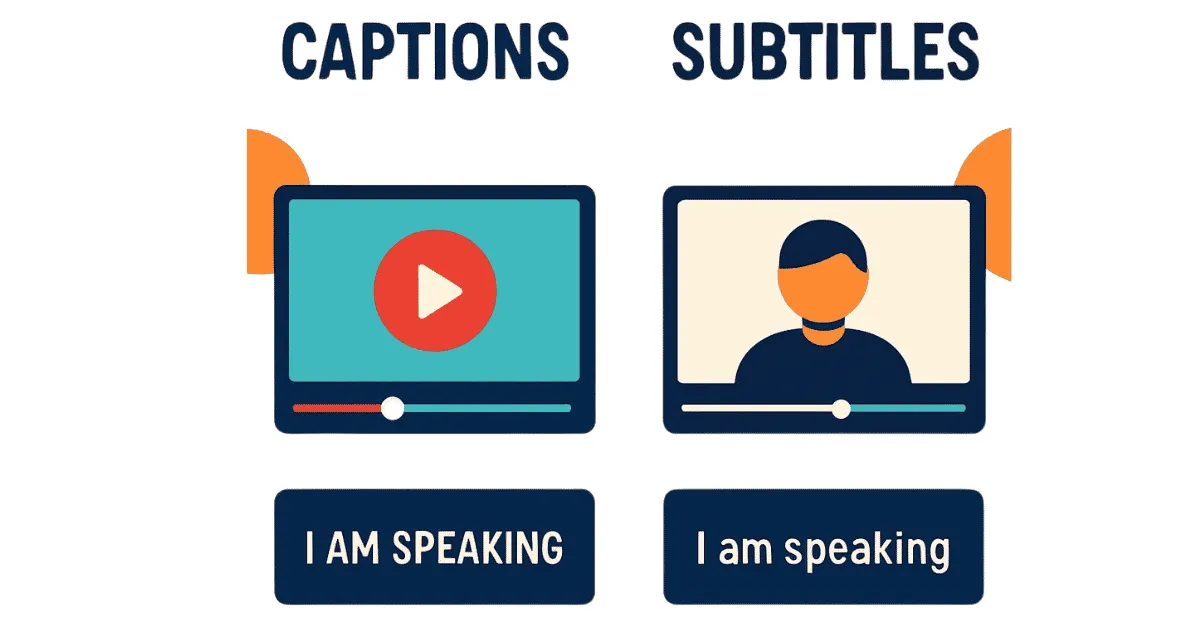
With up to 85% of social media videos now watched entirely on mute, relying purely on audio to deliver your message is a guaranteed way to lose your audience. Read why dynamic, burned-in text has evolved from a basic accessibility feature into a mandatory algorithmic hook designed to stop the scroll to capture attention and boost your retention rates.
Captions vs. Subtitles: Engagement Impact Study
What is the difference between captions and subtitles? Subtitles are designed for viewers who can hear the audio but do not understand the language being spoken (e.g., translating a Spanish film into English text). Captions are designed for viewers who cannot hear the audio, either due to hearing impairment or watching on mute. Captions include the spoken dialogue as well as critical non-speech audio cues (e.g., [doorbell rings], [upbeat music playing]).
Let’s take a deep dive into this topic in this blog post!
You just spent thousands of dollars on a state-of-the-art studio microphone. You hired a professional sound designer to mix the audio levels perfectly. You uploaded your brand's latest flagship video to LinkedIn and TikTok, confident that the message is crystal clear.
But when you check your analytics 24 hours later, the retention graph looks like a cliff. Within the first two seconds, 60% of your audience scrolled away. Why? Because the majority of your audience never heard a single word you said. They were scrolling in a waiting room, commuting on a train, or lying in bed next to a sleeping partner with their phone firmly on mute.
When you encounter this massive leak in viewership, the first technical hurdle to understand is the battle of captions vs subtitles.
While the terms are often used interchangeably by beginners, they serve entirely different psychological and technical purposes in the modern content ecosystem.
If you are a founder, creator, or marketing manager, you must internalize a harsh reality: audio is now optional; text is mandatory.
We live in a "Sound-Off" era. If your video requires sound to be understood, it is effectively invisible to the vast majority of social media users. This impact study breaks down the behavioral data behind muted scrolling, defines the technical differences in post-production text, and proves why adding dynamic, burned-in text is the highest-ROI editing choice you can make in 2026.
(This data guide is an essential companion to our Complete Glossary of Video Editing Terms).
Captions vs. Subtitles: Defining the Terminology
To build a high-converting content pipeline, you need to use the right tools for the right audience. The distinction between subtitles and captions comes down to a single assumption: Can the viewer hear the sound?
What are Subtitles?
Historically, subtitles originated in foreign cinema. They assume the viewer has full hearing capabilities but simply lacks the language comprehension.
-
Assumption: The viewer can hear the bomb exploding in the background, the subtle shift to sad music, and the aggressive tone of the actor's voice.
-
Execution: Subtitles only translate the spoken dialogue. They do not describe sound effects or musical cues because the viewer is already experiencing them audibly.
What are Captions?
Captions were originally developed for the deaf and hard-of-hearing community. They assume the viewer is experiencing the video in total silence.
-
Assumption: The viewer cannot hear anything.
-
Execution: Captions transcribe the spoken dialogue, but they also provide vital context for non-speech audio. They tell the viewer that [Eerie music begins playing] or [Glass shatters off-screen].
-
Closed vs. Open Captions: Closed Captions (CC) can be toggled on and off by the user via the video player (like on YouTube or Netflix). Open Captions (or "Burned-In" captions) are permanently rendered into the video's visual pixels and cannot be turned off.
Social Media Verdict: In performance marketing and social media, you almost always want to use Burned-In Captions. You cannot rely on a user fumbling to find the "CC" button while scrolling at the speed of light. The text must be immediately, permanently visible.
"Sound-Off" Epidemic: Engagement By the Numbers
To understand why captions are critical, we must look at user behavior data. The way consumers interact with video has fundamentally shifted over the last five years.
What is the Data Behind the Mute Button?
Multiple industry studies indicate a staggering reality: depending on the platform, up to 85% of social media videos are watched without sound. On LinkedIn, where users are often scrolling at their office desks, sound-off viewing is the default state.
-
On Instagram feed and Facebook, videos auto-play silently until a user taps to expand them.
-
Even on TikTok, a platform originally built around trending audio,a massive segment of the audience watches on mute when they are in public spaces.
What is the Psychology of the Silent Scroll?
Why is the mute button dominating? It is a matter of environmental context. People consume mobile content in spaces where sound is a social liability:
-
Commuting on public transit without headphones.
-
Waiting in the lobby at the dentist's office.
-
"Second-screening" while watching television with their family.
-
Scrolling in bed while a partner is sleeping.
Impact on Average View Duration (AVD)
If a user is scrolling on mute and your video appears featuring just a "talking head" with no text, they experience zero value. Their brain registers it as a moving photograph of a person moving their mouth.
The cognitive decision to scroll past takes less than 0.5 seconds. Your Average View Duration (AVD) tanks. The algorithm sees that users are abandoning your video instantly, categorizes your content as "low quality," and immediately stops distributing it to the feed. By failing to add text, you didn't just lose that one viewer; you killed the video's algorithmic reach entirely.
Video Accessibility: Expanding Your Market
While optimizing for "sound-off" scrollers is a lucrative growth tactic, treating video accessibility as a core pillar of your brand strategy yields massive dividends in Total Addressable Market (TAM) expansion.
Beyond Legal Compliance
For decades, adding captions was viewed as an administrative chore; a box to check for legal compliance in broadcast television. Today, video accessibility is a proactive growth lever.
The World Health Organization (WHO) estimates that over 400 million people globally have disabling hearing loss. When you fail to add captions to video, you are actively, albeit unintentionally, telling a massive demographic that your brand is not for them. In 2026, exclusionary marketing is bad business. Accessibility builds deep brand loyalty.
Cognitive Processing and Neurodiversity
Accessibility extends far beyond hearing impairments. Reading text while simultaneously listening to audio significantly increases information retention for neurodivergent viewers (such as those with ADHD or auditory processing disorders).
Furthermore, we live in a globalized economy. If your video is in English, millions of non-native English speakers will consume it. For these users, reading the captions helps them follow the pacing of a native speaker, which ensures your value proposition isn't lost in translation or speed.
A Shift from "Utility" to the "Algorithmic Hook"
If you look at television captions from ten years ago, they were purely utilitarian: tiny, boring white text with a black background, sitting passively at the very bottom of the screen.
In the modern DTC and creator space, captions have evolved from a utility into an Algorithmic Hook.
What is the "Hormozi-Style" Revolution?
You have likely seen the trend popularized by creators like Alex Hormozi: dynamic, kinetic text positioned dead-center on the screen, popping up one word at a time, often color-coded, with emojis reinforcing the concepts.
This is not just a stylistic trend; it is a weaponized application of behavioral psychology.
Mastering Visual Pacing
The human eye is naturally drawn to movement. When text pops onto the screen one word at a time, perfectly synced to the speaker's cadence, it creates a continuous "Pattern Interrupt."
The viewer's brain is forced to actively read the next word. This micro-engagement keeps their dopamine levels elevated and prevents their eyes from wandering to the "Next" button. It effectively gamifies the viewing experience. To understand how this ties into overall video rhythm, read our deep dive on Algorithmic Pacing: How Editing Affects AVD.
When you combine aggressive visual pacing with a strong opening statement, dynamic captions become the ultimate tool for Hook Rate Optimization: Editing for the First 3 Seconds.
How AI is Revolutionizing Post-Production Text
If captions are so vital for engagement, why doesn't every brand use them? Historically, it was because adding them was an absolute nightmare.
Transcription Bottleneck
In the past, to add captions to video, an editor had to manually type out every single word spoken in the video. Then, they had to go frame-by-frame on the editing timeline, chopping up the text layers to sync them perfectly with the speaker's lips.
A 60-second video could take an hour just to caption. It bloated budgets, exhausted editors, and delayed publishing schedules.
Editing Machine’s Solution
At Editing Machine, we believe you shouldn't have to choose between speed, budget, and accessibility. We have fundamentally eliminated the transcription bottleneck through our hybrid AI workflow.
When your raw footage enters our ecosystem, advanced AI audio-recognition tools instantly transcribe your audio with near-perfect accuracy and map it to the exact frame timing.
But AI is only the first step. AI cannot understand your brand's unique aesthetic. Once the text is generated, our human editors step in to stylize it. We apply your custom brand fonts, highlight the most impactful "power words" in your brand colors, animate the text to match the energy of the video, and insert relevant emojis to increase visual retention.
Seamless Review via the Client Portal
You never have to worry about a typo making it to your final TikTok ad. Using the native Editing Machine client portal, you can review your video draft directly in your browser.
If you spot a misspelled name or want a different word highlighted, you simply pause the video, click the exact frame, and leave your feedback. Our platform ensures that text revisions are handled swiftly and accurately, without the chaos of scattered email chains.
In Conclusion
In modern content production, treating audio as your primary communication tool is a strategic failure. Audio is an enhancement; text is the foundation.
Understanding the crucial difference in captions vs subtitles allows you to tailor your post-production workflow to the reality of human behavior. Up to 85% of your audience is watching in silence. If you do not give them something to read, they will give their attention to a brand that does.
Stop losing 80% of your audience to the silent scroll. Submit your raw footage to Editing Machine, and let our team integrate high-converting, AI-powered captions into your next campaign. Create your Editing Machine account today and make sure your brand is heard, even when the volume is at zero.
FAQs
What is the difference between captions vs subtitles?
The primary difference between captions vs subtitles comes down to the viewer's ability to hear. Subtitles assume the viewer can hear the audio track but needs the spoken language translated. Captions assume the viewer cannot hear the audio (either due to hearing loss or having their mobile device on mute), so they include text for both the spoken dialogue and critical sound effects (like [footsteps] or [music swells]).
Why is video accessibility important for marketing?
Video accessibility is crucial because it directly expands your Total Addressable Market (TAM). By adding clear captions and visual cues, you ensure your marketing content can be consumed by the deaf and hard-of-hearing community, neurodivergent individuals, non-native speakers, and the vast majority of mobile users who scroll social media with their sound turned off.
Does it cost extra to add captions to video?
Historically, to add captions to video required expensive manual transcription services that bloated production budgets. However, modern professional video services like Editing Machine utilize advanced AI transcription tools alongside human editors to generate frame-accurate, stylized captions as a standard part of the editing workflow, ensuring high engagement without increasing your costs or delaying turnaround times.
What are open captions vs closed captions?
Closed Captions (CC) exist as a separate metadata file and can be turned on or off by the viewer using a button on the video player (common on YouTube). Open Captions (often called "burned-in" captions) are permanently rendered directly into the visual pixels of the video and cannot be turned off. For social media marketing (TikTok, Reels, LinkedIn), open captions are strongly recommended to capture immediate attention.
More from the Blog

Video Content Repurposing: The 10x Multiplier Framework
Most content creators treat repurposing as something they do when they have time, which means they almost never do it. The 10x Multiplier Framework treats it as the default production model: every recording session is planned with repurposing built in from the start, and every edited asset points toward the next format. This guide covers the full framework and the specific formats each recording type should produce.

Shopify Product Video: The Editing Checklist That Lowers Bounce Rate
Adding a video to your Shopify product page is not the same as adding a video that lowers bounce rate and increases conversion. Most product videos on Shopify are too long, start too slowly, and are not optimized for silent autoplay on mobile. This editing checklist covers every decision that separates a product video that converts from one that gets scrolled past.

Dedicated Video Editor Service: When a Subscription Beats a Full-Time Hire
Most businesses that are considering hiring a full-time video editor have not run the real numbers. When you include benefits, equipment, software licenses, desk space, and management overhead, a full-time junior editor in the US costs $65,000 to $80,000 per year in total. This guide runs the full cost comparison and identifies the output threshold at which a subscription service wins on economics.
See if Editing Machine is the right fit for your content.
Take 90 seconds to tell us about your goals, content style, and volume. We'll show you which setup fits and exactly where to start.